Server Notifications
What notifications can I receive?
Currently, you can receive notifications about:
- server starting
- server stopping
- server shutting down
- server restarting
- service renewal
- server password change
- adding/removing users on the server
How to configure notifications?
- Log in to the SkillHost panel.
- Go to the „Your services” tab on the left side.
- Select and open your server.
- Navigate to the „Configuration” tab.
- Fill out the Webhook Configuration form.
- In the „Adres” field, enter your Discord webhook URL.
- Click the Add button.
How to generate a WebHook URL?
- Go to your Discord server, then create the channel to receive notifications on.
- Select the settings icon (gear) on the channel.

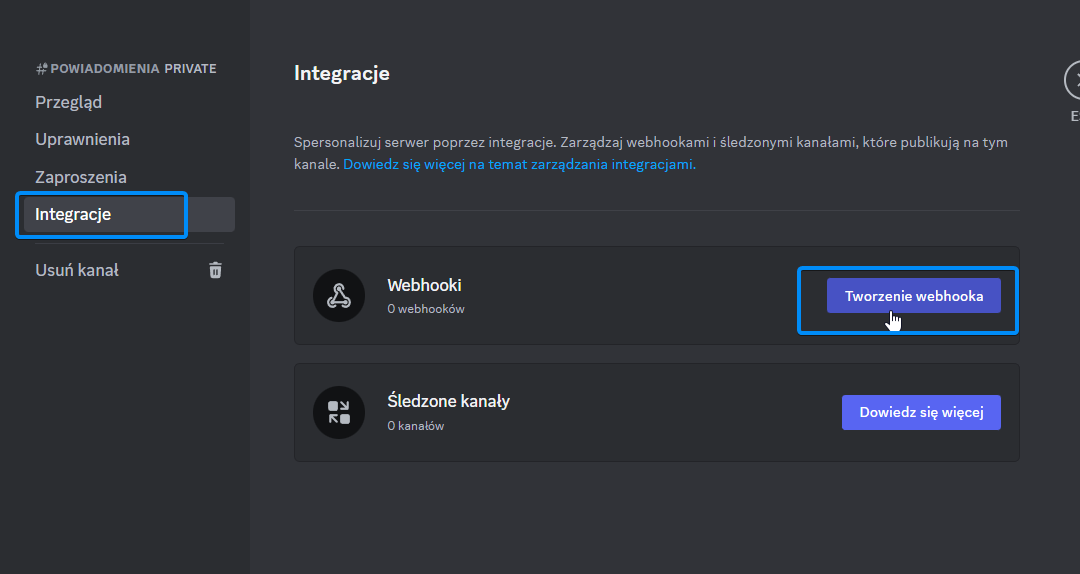
- From the list, choose „Integrations”, then click „Create Webhook”.
- Finally, click „Copy Webhook URL”.
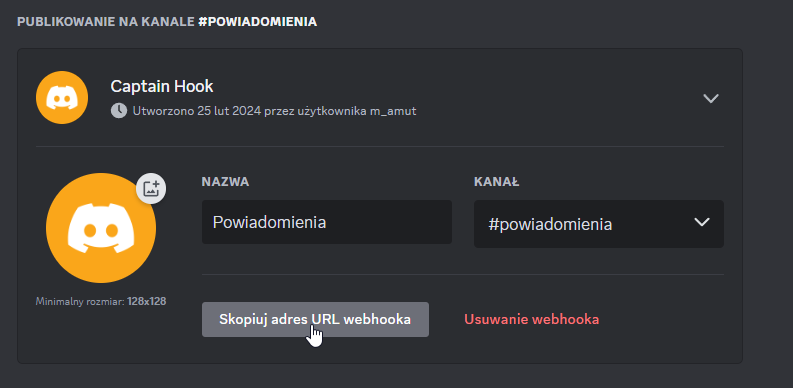
Done, your webhook has been generated.