Local Firewall – Configuration & Management
Local Firewall is a security mechanism running directly on the physical host (node) that controls network traffic between the external network and the client server. It allows you to define detailed filtering rules for incoming and outgoing traffic at the host level before it reaches the virtual machine layer.
Main Features of Local Firewall
Local Firewall enables:
- Protecting instances from unauthorized access
- Applying predefined security groups
- Managing IP sets (IPset)
- Monitoring and responding to requests from identified ASNs
- Creating trusted IP address lists (whitelist)
Rules Tab
The Rules tab manages network traffic policies. Rules are processed from top to bottom — the first matching rule is applied.
Adding a New Rule
Rule Type:
Incoming (INPUT)– traffic destined for the serverOutgoing (OUTPUT)– traffic originating from the server
Action:
Accept– allow trafficReject– drop traffic without responseReject with reply– drop traffic and send rejection notice
Protocol:
Available protocols: Any, TCP, UDP, ICMP, ICMPv6, AH, ESP, GRE, IPv6, IPv6-ICMP, IPv6-NoNxt, IPv6-opts, IPv6-Route, OSPF, PIM, SCTP
For port-based protocols (TCP, UDP) you can specify:
- Single port:
80 - Port range:
1000:2000
Source & Destination:
IP/CIDR– single IP address (192.168.0.1) or network (10.0.0.0/24)IPset– predefined set from the Security Groups tabUser IPset– IPset created in the IPsets tabASN– Autonomous System Number
Unsafe Zone
An Unsafe Zone option allows resetting firewall settings.
This action is irreversible. Be sure you know what you’re doing before resetting firewall settings.
This function:
- Removes all configured rules
- Restores default firewall settings
Security Groups Tab
Security Groups are ready-made rule sets for quick application of common security configurations.
Available Groups
Allow Cloudflare – permits traffic from Cloudflare IPs on ports 80 and 443.
Adding a security group does not automatically block other traffic. To block all other traffic, add a separate reject rule in the Rules tab.
IPsets Tab
IPsets allow you to create custom sets of IP addresses or networks usable in firewall rules as source or destination.
Creating a New IPset
- In Add new IPset, enter:
- Set name: unique name with letters, digits, underscores (e.g.,
my_servers) - Description (optional): brief purpose description (max 32 chars)
- Set name: unique name with letters, digits, underscores (e.g.,
- Click Create IPset.
- The new IPset appears under Your IPsets.
Adding Addresses to an IPset
If you are adding the IP address of someone who has Orange internet, you should add the entire ASN due to variable IP addresses.
- In Your IPsets, click an IPset to edit.
- In Edit IPset, under “Add new IP or network,” enter an IP or CIDR network (e.g.,
192.168.1.0/24or203.0.113.5). - Click Add to add it to the list.
- Repeat for additional entries.
- Click Close when done.
Deleting an IPset automatically removes it from all rules that use it.
Practical IPset Usage
Creating an SSH Whitelist
-
Create IPset for trusted IPs
- Name:
trusted_ips - Add your trusted IPs or networks (find your IP at whatismyipaddress.com)
- Name:
-
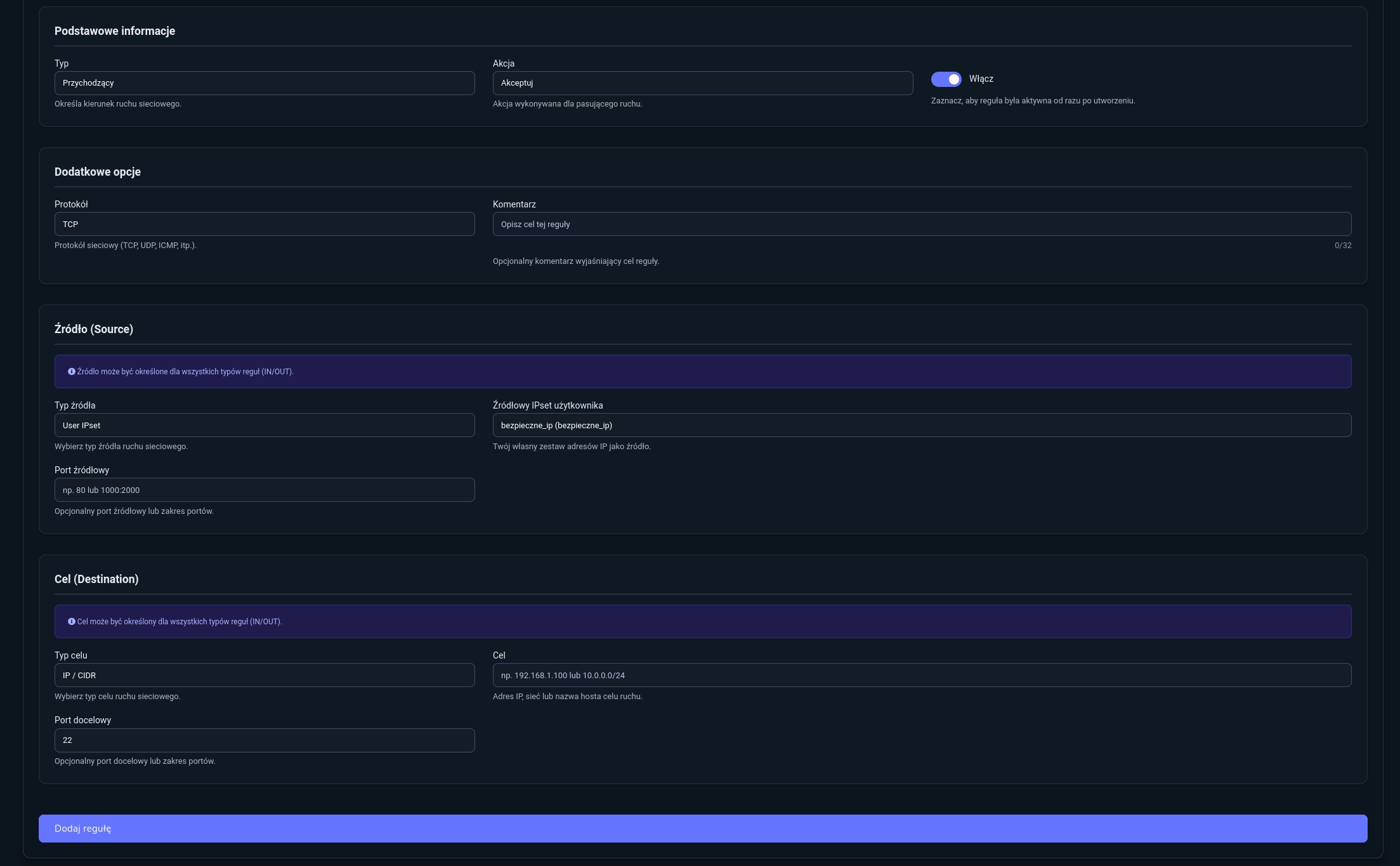
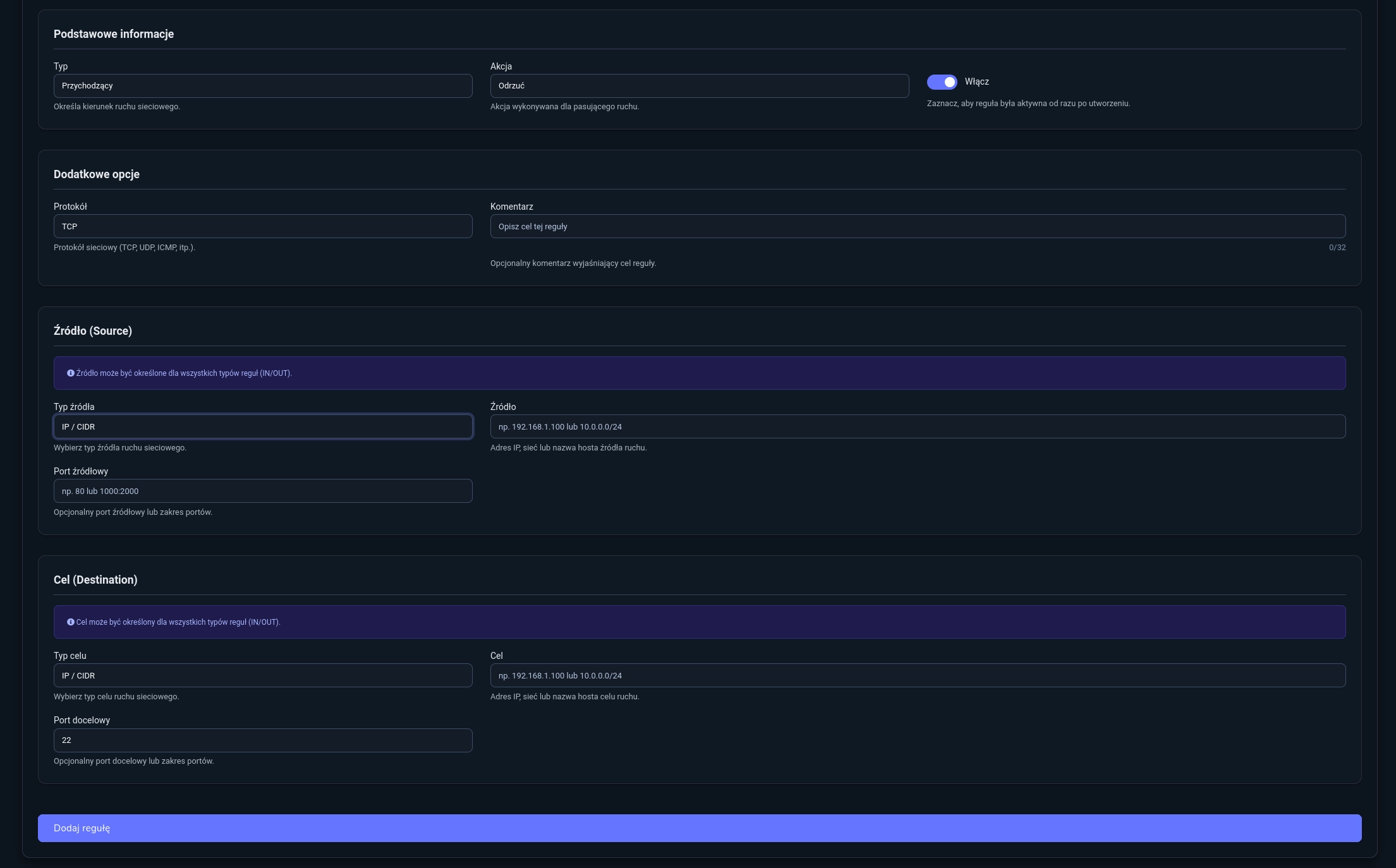
Configure firewall rules:
- Rule 1
- Type:
Incoming - Action:
Accept - Protocol:
TCP - Source Type:
User IPset - Source IPset:
trusted_ips - Destination Port:
22
- Rule 2
- Type:
Incoming - Action:
Reject - Protocol:
TCP - Destination Port:
22
- Type:
-
Manage IPset
- Add IPs: edit IPset, use “Add new IP or network.”
- Remove IPs: click trash icon next to entry.
Configured SSH whitelist:

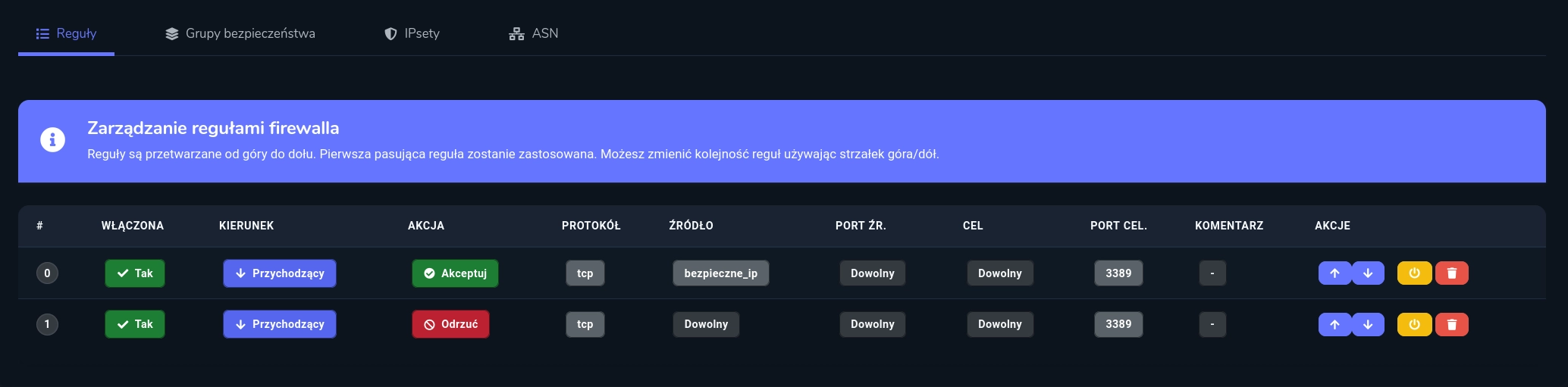
Creating an RDP Whitelist
-
Create IPset for trusted IPs
- Name:
trusted_ips - Add your trusted IPs or networks (find your IP at whatismyipaddress.com)
- Name:
-
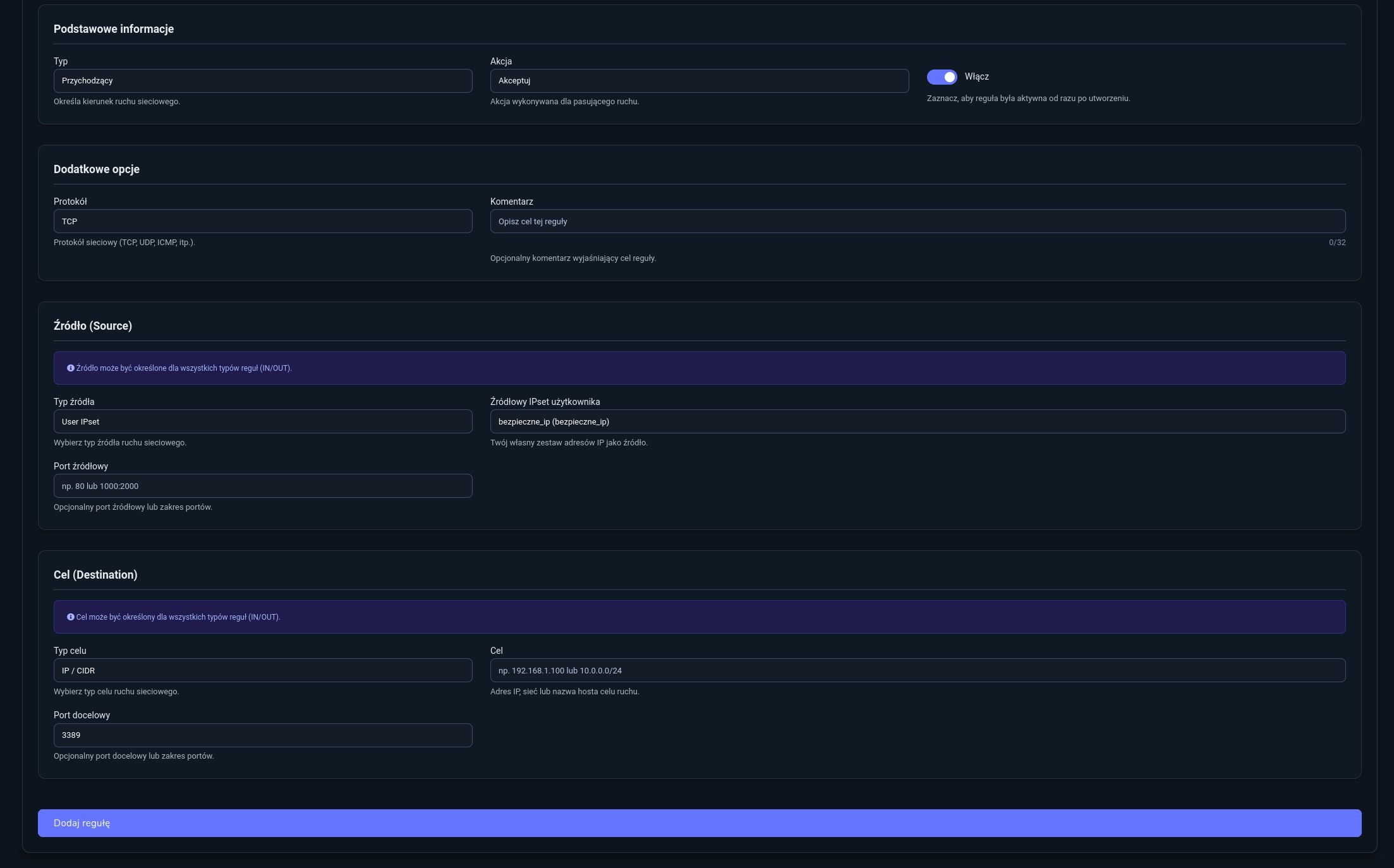
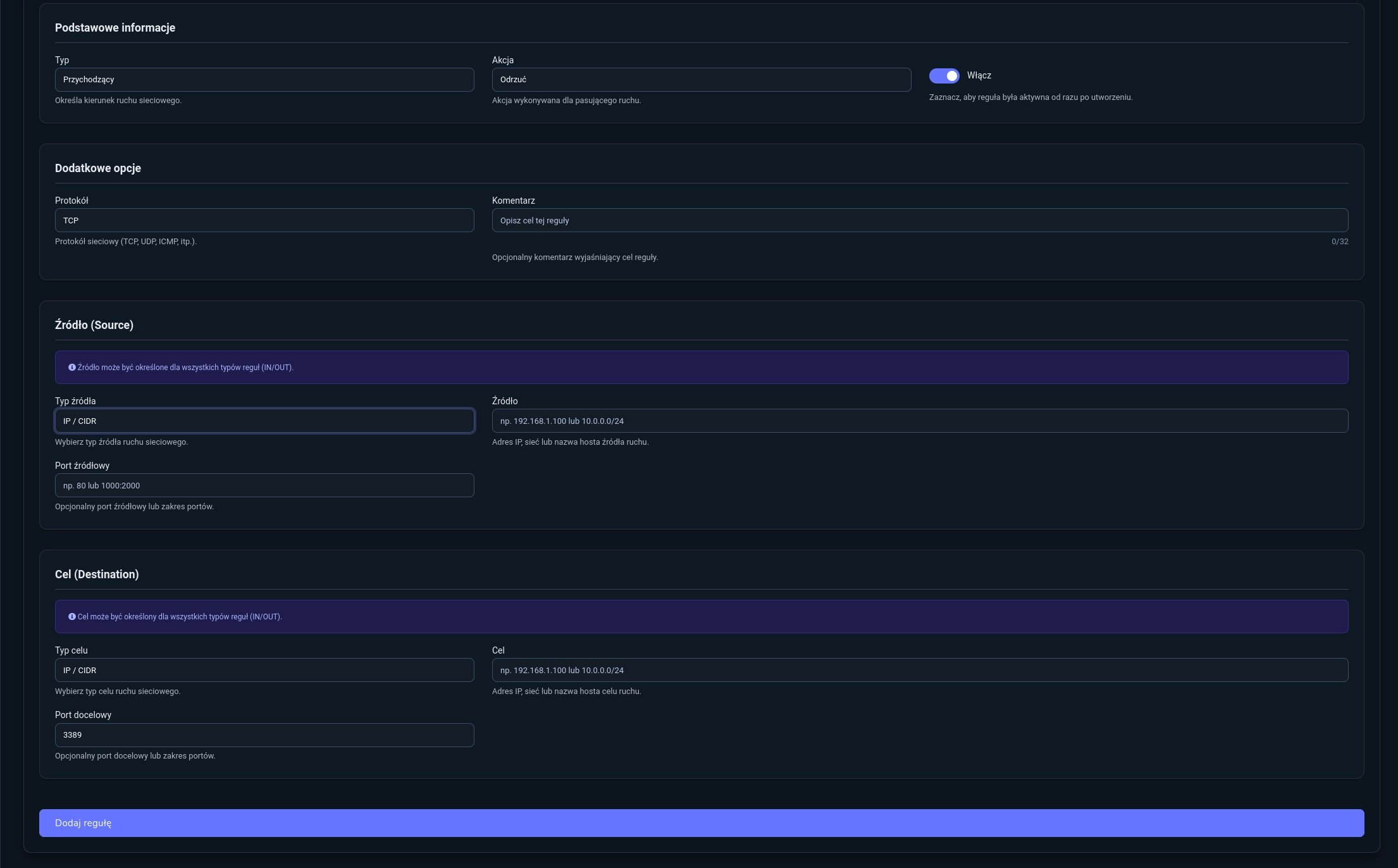
Configure firewall rules:
- Rule 1
- Type:
Incoming - Action:
Accept - Protocol: `TCP
- Source Type:
User IPset - Source IPset:
trusted_ips - Destination Port:
3389
- Type:
- Rule 2
- Type:
Incoming - Action:
Reject - Protocol:
TCP - Destination Port:
3389
- Type:
- Rule 1
-
Manage IPset
- Add IPs: edit IPset, use “Add new IP or network.”
- Remove IPs: click trash icon next to entry.
Configured RDP whitelist:
IPsets speed up firewall performance by grouping many addresses in one rule. They simplify organization and maintain configuration clarity.
ASN Tab
When an ASN value is used in a rule, the ASN tab shows all IPs in that autonomous system.
Use cases:
- Monitor traffic from specific network providers
- Restrict access from certain ASNs (e.g., Amazon, Google, Cloudflare)
- Analyze traffic origins